
You can keep in touch on social media or with emails, you can even post your holiday snaps on our guestbook.Check your emails, post social updates, search and browse the web and stream your favourite TV and Movies throughout your stay at Hendra Holiday Park.
About our Wi-Fi services
There is free Wi-Fi in the Terrace Bar and Restaurant, in Henry’s Playloft and on the Pool Terrace. There is also pay-as-you-go Wi-Fi across the site in the touring and static areas.
Caravans in Meadow and Cherry, Beech, Gannel View and Laurel field are fitted with superfast pay-as-you-go direct to caravan Wi-Fi service.
- For the Meadow Lodges, your Wi-Fi access is included.
- For all other caravans you need to pay for Wi-Fi. When you first connect you’ll be asked to make an online payment via our portal. Once you’ve paid and connected, anyone else in the caravan can then access the Wi-Fi for the duration of your purchased internet package.
How to connect to Wi-Fi
Follow these simple steps to connect your Meadow or Cherry caravan to Hendra’s superfast Wi-Fi and purchase a package:
Note: If you are trying to connect in the touring or any static caravans (not on Meadow, Cherry, Gannel View, Laurel) then follow our how to connect to WiFi connection guides.
Step 1 – Connecting to your in-caravan Wi-Fi
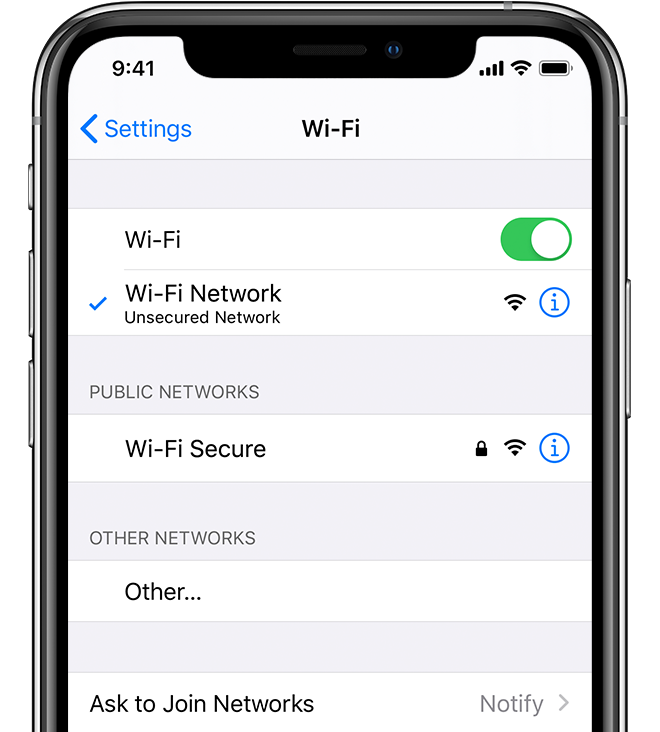
- On your device, make sure the Wi-Fi is turned on.
- Go into the Wi-Fi or network settings on your device and select the network name which corresponds with your caravan number. For example, if you’re in Caravan Meadow 10 then select the Wi-Fi network named “Meadow_10”.
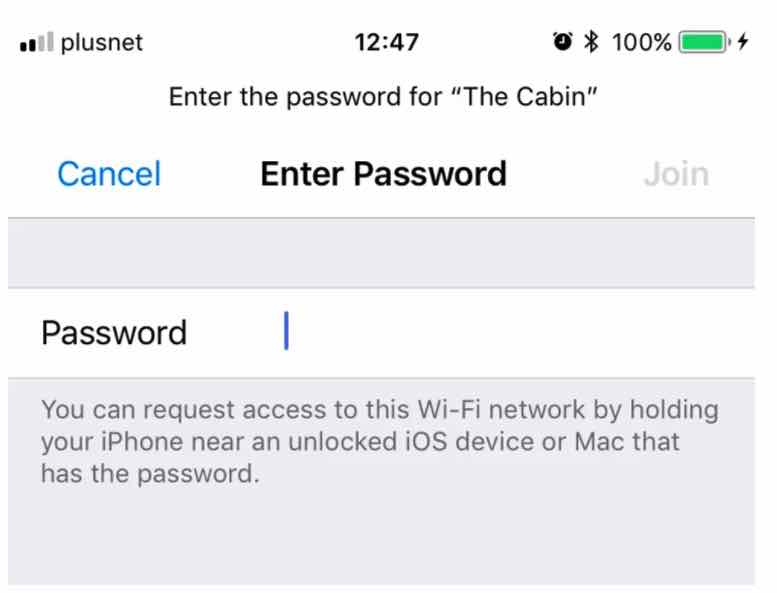
- When prompted enter the specific password for that caravan – you can find this on the Getting Started Guide in the caravan and on the welcome guide.
Step 2 – Making a payment for Wi-Fi
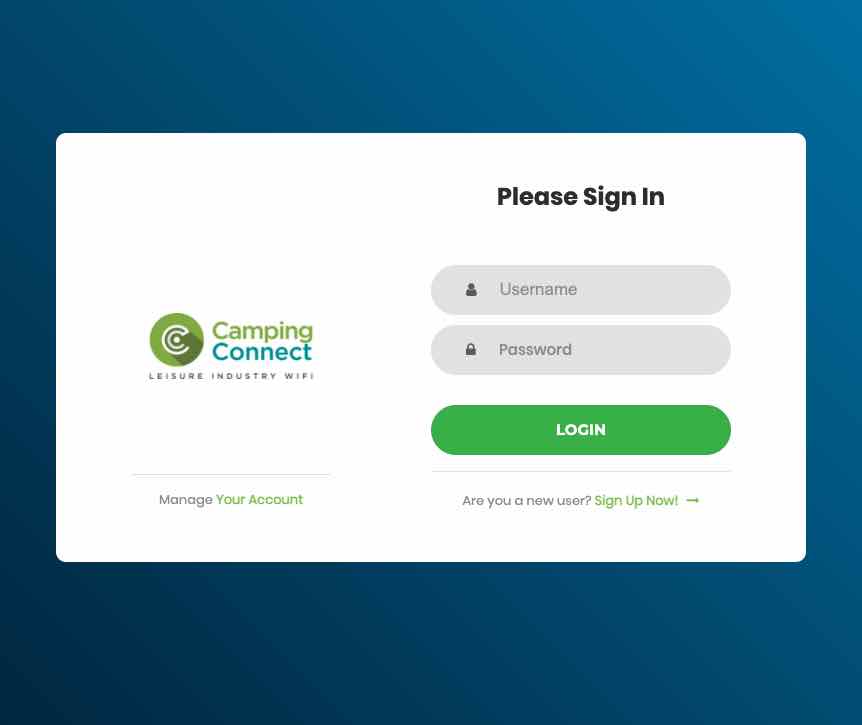
- Once connected to Wi-Fi, you should be redirected to the Wi-Fi portal.
- If you are a new user, click Are you a new user? Sign Up Now! at the bottom of the page.
- Once clicked, the packages page will appear in 5-10 seconds.

- From the packages page, select a package to suit your needs.
- Click next and create a username and password – write this down you’ll need it later.
- Click next and enter your contact and billing details.
- Click next, enter your payment card details and accept our terms and conditions.

Once your payment has been processed – you will return to the sign-in page, simply enter your username and password you choose earlier and click Login
Note: anyone else in the caravan can now access the internet by following step 1 connecting to the router.
We have a step by step visual guide on our support pages and you can also see a brief animation below.
If you encounter any problems during the sign-up process or if you are having any further issues please contact our technical support team.
Packages explained
Free, Basic & Premium Packages
Free Access
Available 24/7 at the social and public venues such as the Terrace Bar, Oasis Pool, Deck Bar, Marios Pizza and the Soft Play areas.
Speeds: Suitable for general use, apps etc.
Restrictions: Streaming sites such as Netflix are blocked.
Basic Access
Time: You can stay logged in for the duration you purchase (i.e. 3 days)
Speed: 2 Mbps Download 2 Mbps Upload – suitable for browsing, some lower quality video will buffer.
Devices: Unlimited devices but will slow down as the connection is shared.
Data: Unlimted.
Unlimited Access
Time: Unrestricted, you can stay logged in for the duration you purchase (i.e. 3 days)
Speed: 10 Mbps download and 10 Mbps Upload shared with the whole caravan aiming to support standard-definition video and audio for multiple devices.
Devices: Unlimited devices but suitable for 5 concurrent users.
Data: Unlimited use, all you can eat data.
Troubleshooting your connections
If you’re having trouble connecting to the network view our connection guides page for help on connecting your specific device connection info.
- Q: The Wi-Fi password is not working
A: Ensure that you’ve selected the correct Wi-Fi network which is named after the caravan you’re staying in. - Q: The signal is not strong enough or the connection is buffering
A: Please ensure that you have selected a suitable package for your needs. In general, the basic package is not suitable for streaming or multiple devices accessing anything other than basic content.
If you require streaming or multiple devices please choose our premium package or upgrade via your account management screen portal.campingconnect.co.uk. - Q: I forgot my username/password
A: If you have mobile access you can use the “forgotten username or password options on the page that pops up when you first connect to our Wi-Fi; else you will need to contact our team.
Go to the forgetting networks page for info on forgetting Wi-Fi networks on a variety of devices.
You can see a summary of your subscription details, payments etc when you access your account at portal.campingconnect.co.uk
If you purchase a package and are unhappy with the service provided, please contact us as soon as possible, so that we can assist you.
Managing your devices
The router in your caravan is just like the one from home. Providing you’ve paid for a package or using the inclusive servce the router will provide internet access for the duration for an unlimted amount of devices. All you’ll need to do is enter the specific caravan router password on any device and you should get connected.
Getting further support & help
If you wish to speak with someone you have some options, either send us a message, send a text or phone us you can also chat with us online.
Our opening hours can be found on our Google Business Page.